


Pressus FaceLock FR40
Pressus FaceLock FR40
Walk up and walk in. Your door recognises your face before you reach for anything.
Regular price
£299.99
Regular price
£299.99
Sale price
£359.99
Unit price
per
SAVE 16%
Sold out
No Subscription
·
No Cloud Fees
·
No Hidden Charges
·
Buy Once. Protected Always.
-
Walk through your front door without touching a thing.
-
See who is at your door before you open it, from anywhere.
-
Know the moment anyone approaches. Before they even knock.
-
Issue a code to guests and cancel it the moment they leave.
-
Pay once and you are done. No monthly bills ever.
Couldn't load pickup availability
-
-
-
-
-
-
-
Free
Shipping
60-Day
Money Back
No
Subscription
1-Year
Warranty
Pressus — FAQ Scroll Button

Pressus FaceLock FR40
Regular price
£299.99
Regular price
£299.99
Sale price
£359.99
Unit price
per
SAVE 16%
Sold out
Pressus FaceLock FR40 - Product Details
1-Year Guarantee & 60-Day Money Back
1-Year Warranty
Any defect, we fix it or replace it.
60-Day Money Back
Full refund within 60 days. No questions asked.
Free Shipping
Delivered fully tracked at no extra cost.
Customer Support
Always here to help. Email us at support@pressusstore.com
Features
Face Unlock in 0.2 Seconds
Opens before you reach for anything. Works in complete darkness.
Cannot Be Fooled
Photos, videos and masks do not work. Financial grade accuracy.
8 Ways to Unlock
Face, fingerprint, code, card, app, temp code, combination, physical key.
120° HD Camera
Day and night footage. View live from your phone anywhere.
Visitor Detection
Photo alert sent to your phone the moment anyone approaches.
Indoor Screen
See who is outside without leaving your seat.
Remote App Control
Unlock from anywhere. Issue and cancel codes in seconds.
Works for the Whole Family
Recognises heights from 1.3m to 2.0m. Children included.
Reinforced Steel Body
Pry resistant, saw resistant, tested to 200,000 cycles.
Emergency USB Power
Dead battery? Any power bank gets you inside.
Specifications
Face Recognition AI 3D structured light technology Recognition Speed Under 0.2 seconds Recognition Distance 0.3m to 1.1m Recognition Height 1.3m to 2.0m False Recognition Rate Less than 0.0001% Unlock Methods Face, Fingerprint, Password, IC Card, Temp Code, App Remote, Combination, Physical Key Camera 120° wide angle HD with night vision Indoor Display Full colour IPS screen with live view and entry records Visitor Detection PIR infrared sensor with photo push alert Tamper Alert Real time push notification on any forced attempt Body Material Aviation aluminium alloy with 304 stainless steel Lock Cylinder True C Class safety cylinder Security Pry resistant, saw resistant, signal attack resistant Motor Testing 200,000 cycles Battery 3200mAh lithium Emergency Power USB power bank port Suitable For Wooden doors, apartment doors, residential doors
Shipping Details
Your order is tracked from the moment it leaves our warehouse.
Estimated Delivery
Most orders arrive within 5 to 11 business days. Tracking number sent within 24 hours of dispatch.
Shipping Cost
✓ FREE shipping. No hidden fees, ever.
Need Help?
Questions about your door or order? Reach us at support@pressusstore.com
Questions About Your Order?
Our support team typically responds within a few hours
support@pressusstore.com
View full details
-
Walk through your front door without touching a thing.
-
See who is at your door before you open it, from anywhere.
-
Know the moment anyone approaches. Before they even knock.
-
Issue a code to guests and cancel it the moment they leave.
-
Pay once and you are done. No monthly bills ever.
Couldn't load pickup availability
Free
Shipping
60-Day
Money Back
No
Subscription
1-Year
Warranty

Pressus FaceLock FR40
1-Year Guarantee & 60-Day Money Back
Features
Face Unlock in 0.2 Seconds
Opens before you reach for anything. Works in complete darkness.
Cannot Be Fooled
Photos, videos and masks do not work. Financial grade accuracy.
8 Ways to Unlock
Face, fingerprint, code, card, app, temp code, combination, physical key.
120° HD Camera
Day and night footage. View live from your phone anywhere.
Visitor Detection
Photo alert sent to your phone the moment anyone approaches.
Indoor Screen
See who is outside without leaving your seat.
Remote App Control
Unlock from anywhere. Issue and cancel codes in seconds.
Works for the Whole Family
Recognises heights from 1.3m to 2.0m. Children included.
Reinforced Steel Body
Pry resistant, saw resistant, tested to 200,000 cycles.
Emergency USB Power
Dead battery? Any power bank gets you inside.
Specifications
| Face Recognition | AI 3D structured light technology |
| Recognition Speed | Under 0.2 seconds |
| Recognition Distance | 0.3m to 1.1m |
| Recognition Height | 1.3m to 2.0m |
| False Recognition Rate | Less than 0.0001% |
| Unlock Methods | Face, Fingerprint, Password, IC Card, Temp Code, App Remote, Combination, Physical Key |
| Camera | 120° wide angle HD with night vision |
| Indoor Display | Full colour IPS screen with live view and entry records |
| Visitor Detection | PIR infrared sensor with photo push alert |
| Tamper Alert | Real time push notification on any forced attempt |
| Body Material | Aviation aluminium alloy with 304 stainless steel |
| Lock Cylinder | True C Class safety cylinder |
| Security | Pry resistant, saw resistant, signal attack resistant |
| Motor Testing | 200,000 cycles |
| Battery | 3200mAh lithium |
| Emergency Power | USB power bank port |
| Suitable For | Wooden doors, apartment doors, residential doors |
Shipping Details
Your order is tracked from the moment it leaves our warehouse.
Estimated Delivery
Shipping Cost
Need Help?
Questions About Your Order?
Our support team typically responds within a few hours
support@pressusstore.com


Installed in Minutes.
No Locksmith Needed.
Three simple steps. A screwdriver, 20 minutes, and you're done.


Installed in Minutes. No Locksmith Needed.
Three simple steps is all it takes. A screwdriver, 20 minutes, and you're done — no drilling, no specialist tools, no experience required.
Smart Access On Demand
Face recognition, visitor alerts, remote unlocking and a camera that never sleeps — all in one lock.

3D Face Recognition
Unlocks in under 0.2s with a false recognition rate below 0.0001%

PIR Visitor Alerts
Detects anyone at your door and pushes a photo to your phone instantly


120° HD Day & Night Camera
Wide-angle camera with infrared fill light streams live to the indoor screen and your phone around the clock.

Remote One-Tap Unlock
Unlock for a delivery, guest, or tradesperson from anywhere in the world — directly from the app.
Customer Reviews
What Customers Are Saying

"Face recognition is instant. Walks up, door opens. Incredible."

"The camera on the front is a bonus I didn't expect. Really useful."

"Looks premium on the door. Easy to set up and works first time."

"Never thought I'd have face unlock on my front door. Here we are."

"PIR alerts are great. Know every time someone approaches the door."

"Indoor screen is really handy. Use it more than the app."
"Face recognition is instant. Walks up, door opens. Incredible."
"The camera on the front is a bonus I didn't expect. Really useful."
"Looks premium on the door. Easy to set up and works first time."
"Never thought I'd have face unlock on my front door. Here we are."
"PIR alerts are great. Know every time someone approaches the door."
"Indoor screen is really handy. Use it more than the app."
Why Pressus
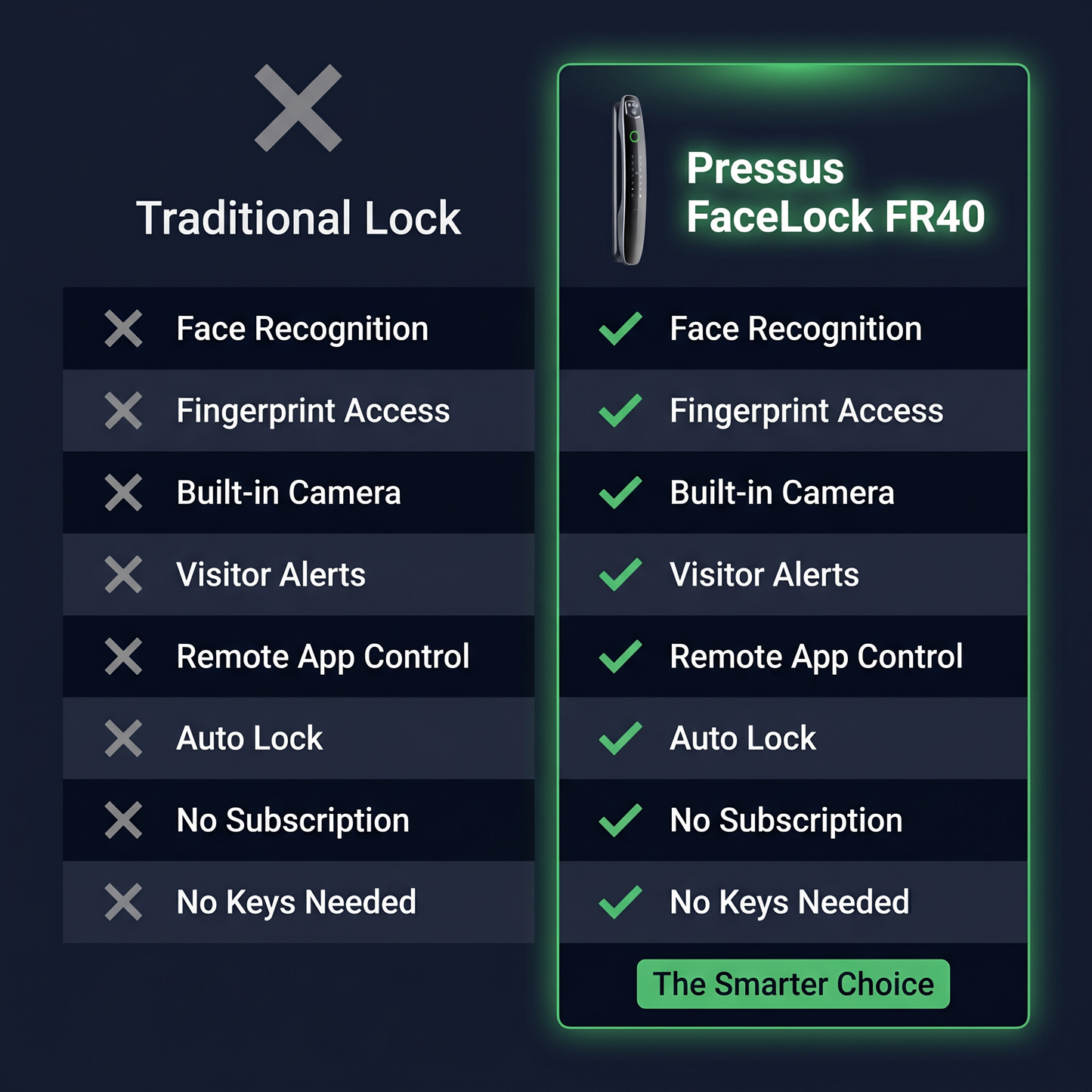
Pressus vs. Other Brands
AI face recognition in under 0.2 seconds. Eight ways in. Zero compromises.
Guarantee
Try It Risk-Free for 60 Days
Install it. Use every unlock method. Live with it. If it is not right for you, return it for a full refund. No questions asked.
Your Face Is
The Key.
Walk up and walk in. No hands, no keys, no codes. The FR40 recognises you before you even reach the door.
No hidden fees · No subscription · Delivered to your door
Frequently asked questions
How do I unlock the door?
How do I unlock the door?
The FaceLock FR40 gives you six ways in: 3D infrared face recognition, fingerprint, password, IC card, mechanical key, or the Usmart Go app. If one method doesn't work you always have five others — you'll never be locked out.
What doors is it compatible with?
What doors is it compatible with?
The FR40 fits wooden doors, stainless steel doors, bronze doors, double doors, and old-fashioned security doors. It's compatible with both left and right opening doors. Not sure if it fits your door? Email us at support@pressusstore.com and we'll confirm before you order.
Is it difficult to install?
Is it difficult to install?
Most customers install it themselves without specialist tools. Full instructions are included and the lock is compatible with both left and right opening doors so no modifications are needed in most cases. Our support team is available at support@pressusstore.com if you get stuck.
How does face recognition work in the dark?
How does face recognition work in the dark?
The built-in infrared sensor camera uses far infrared fill light with automatic dimming, so it captures a clear image day and night without overexposure. Face recognition works reliably in low-light conditions and complete darkness.
What if my face isn't recognised — am I locked out?
What if my face isn't recognised — am I locked out?
No. The FR40 has multiple unlock methods — face recognition, fingerprint, password, IC card, mechanical key, and app. If face recognition ever misreads, you have five instant alternatives. You'll never be stuck outside.
What heights does the face recognition cover?
What heights does the face recognition cover?
The recognition area covers heights from 4'3" to 6'6" — designed so children don't need to tiptoe and adults don't need to bend down. The whole family can use it naturally.
How long does the battery last?
How long does the battery last?
The FR40 has a built-in rechargeable lithium battery. One full charge lasts approximately 3 months with normal daily use. The lock gives you a low battery warning in advance so you're never caught off guard.
What happens if the battery dies completely?
What happens if the battery dies completely?
You're never locked out. There's an emergency power supply port on the lock so you can connect an external power source and get inside instantly. The mechanical key also works regardless of battery state.
Can multiple people have access?
Can multiple people have access?
Yes. You can register multiple faces, fingerprints, passwords, and IC cards. Each person can have their own method — family members, frequent visitors, and temporary guests all managed separately from the Usmart Go app.
Can I give cleaners or guests access without sharing my personal code?
Can I give cleaners or guests access without sharing my personal code?
Yes. Through the Usmart Go app you can create time-limited access codes that expire automatically after a set date and time. When access is no longer needed, delete it instantly from the app — no awkward "can I have the key back" conversations.
Can I manage access remotely?
Can I manage access remotely?
Yes. Through the Usmart Go app you can create time-limited access codes that expire automatically after a set date and time. When access is no longer needed, delete it instantly from the app — no awkward "can I have the key back" conversations.
Can I see who's at the door before opening it?
Can I see who's at the door before opening it?
Yes. The built-in 120° wide-angle camera feeds live to the indoor IPS colour screen and to your phone via the app. The PIR infrared sensor detects anyone standing at the door and pushes a photo alert to your phone immediately.
Is it secure against hacking or signal interference?
Is it secure against hacking or signal interference?
The FR40 is built with anti-electromagnetic interference protection, meaning it resists so-called "black box" or Tesla coil attacks used against weaker smart locks. The C-Class lock cylinder and 304 stainless steel body resist physical attack. Your biometric data is stored locally on the device and never uploaded anywhere.
Which app do I download?
Which app do I download?
Download the Usmart Go app from the App Store or Google Play. Search Usmart Go and it's the first result. The app walks you through setup step by step.
Shipping & returns
Shipping & returns
Free shipping on all orders. Not satisfied for any reason? Contact us within 60 days at support@pressusstore.com for a full refund.